Why Is My Pod System Blinking China Best Guide?

Time:2026-10-03 Author:Ethan
0%

When a pod device flashes, the light is rarely random. It usually signals a condition involving the battery, pod connection, coil, charging process, or internal protection system. If you are asking, “why is my pod system blinking,” the correct answer depends on the brand, blinking color, and number of flashes. A blue pulse may indicate normal activation, while repeated red flashes can suggest low power, poor contact, or a detected fault.

Isidor Buchmann, founder of Cadex Electronics and Battery University, has stated, “There is no one-size-fits-all battery.” That warning matters here. Pod systems use different battery controls, charging circuits, and error codes, even when their designs look similar. This guide examines common blinking patterns found in pod devices, including products manufactured in China, without assuming every model behaves identically. The user manual remains the strongest reference.

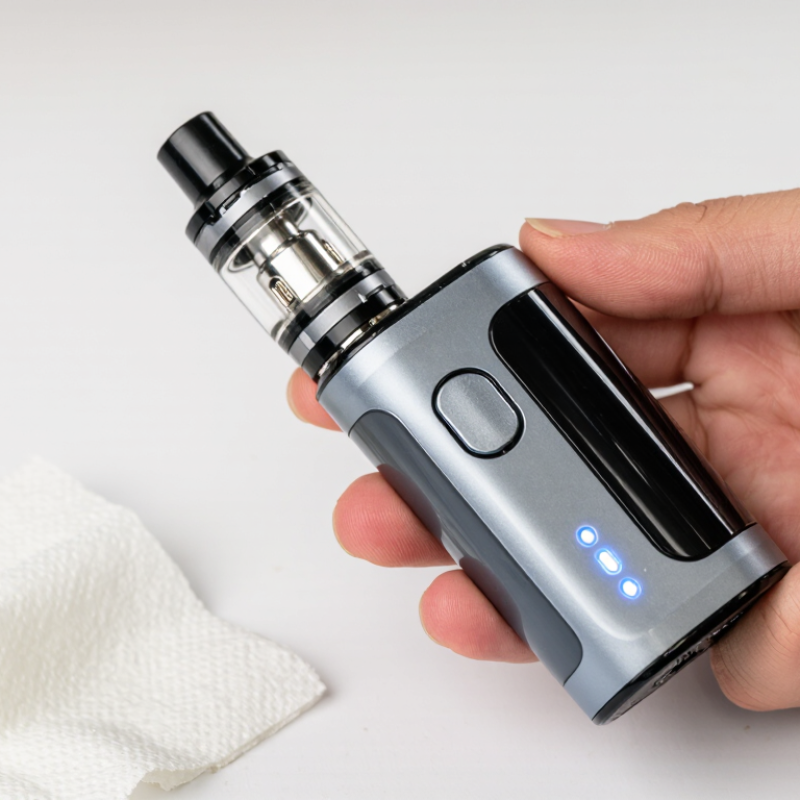
Start with simple details. Is the pod seated firmly? Are the metal contacts dry and clean? Does the device feel unusually warm? A small tissue can remove condensation, but sharp tools may damage the contacts. I have seen people replace a coil immediately, when the real problem was a loose pod. That mistake is easy to make.

Stop using the device if it leaks, swells, smells unusual, or becomes hot. Do not bypass safety features or use an incompatible charger. The blinking light is a clue, not a diagnosis. Careful observation prevents careless guesses.
Why Is My Pod System Blinking China Best Guide?

What a Blinking Pod System Light Usually Indicates

A blinking pod system light usually communicates a condition, not a random fault. The exact meaning depends on the device’s light color, flashing speed, and number of pulses. A slow white blink may indicate activation, while repeated red flashes often suggest a low battery. Some devices blink when charging, especially near full capacity.

I used to assume every blinking light meant the battery was empty. That assumption was wrong. A loose pod, dirty contact points, or poor airflow can trigger similar signals. Remove the pod and inspect the metal contacts for moisture or residue. Wipe them gently with a dry cotton swab. Reattach the pod firmly, without forcing it. A weak connection can make the light flash several times.

Count the flashes.

Check the user manual before guessing. Manufacturers sometimes use different codes for short circuits, overheating, charging errors, or an empty pod. If the device feels unusually hot, leaks, smells burnt, or has visible damage, stop using it. Do not continue charging it. Replace the damaged unit through an appropriate local service channel. If the light keeps blinking after cleaning and charging, the internal sensor or battery may be failing. In that case, repeated testing is not helpful. My own troubleshooting became slower when I skipped the manual. A careful pause often prevents a simple connection issue from becoming a bigger one.

How to Identify Different Blinking Patterns and Their Meanings

Why Is My Pod System Blinking China Best Guide?

A blinking pod system usually communicates through a small light near the button or charging port. The exact code differs between models, so check the supplied manual before making assumptions. In my experience, one short blink often means the device has activated normally. Repeated flashes may indicate a weak battery, poor pod contact, or an internal protection response.

Watch the rhythm carefully. Three quick flashes commonly suggest low power or an incomplete connection. A longer series can appear when the pod is missing, installed incorrectly, or nearly empty. Remove the pod, wipe its metal contacts with a dry cotton swab, and reinstall it firmly. Do not force it. A light that flashes during charging may be normal, while continuous flashing, unusual heat, or a burning smell requires immediate disconnection. Safety matters more.

Count the flashes slowly.

I once misread a five-flash pattern as a dead battery. The actual problem was condensation around the contacts. That mistake was a useful reminder: blinking codes are clues, not final diagnoses. If the light continues after charging and cleaning, stop using the device. Avoid opening the casing or replacing internal parts yourself. Record the color, number, and timing of each flash, then consult the manual or a qualified service professional. Different versions may use similar patterns, which makes guessing unreliable.

Step-by-Step Checks for Battery, Pod, and Connection Problems

Why Is My Pod System Blinking? China Best Guide

Step-by-Step Checks for Battery, Pod, and Connection Problems

A blinking light usually signals a warning, not a mystery. Count the flashes first. Different devices use different codes, so check the user manual before guessing. In a hands-on check, I remove the pod and inspect the battery contacts under bright light. E-liquid, dust, or a bent contact can interrupt the connection. Wipe the area with a dry cotton swab. Do not use water or metal tools.

Then test the battery. Connect the device to its approved charging cable and place it on a clear, stable surface. If the light blinks during charging, the cable may be loose, damaged, or incompatible. A battery that becomes unusually hot, swells, smells strange, or shows physical damage needs immediate attention. Stop using it. The U.S. Fire Administration identifies damage, overheating, and overcharging as recurring lithium-ion battery hazards. NFPA estimates about 25,000 lithium-ion battery fires occurred in the United States from 2017 to 2022.

Reconnect the pod gently, without forcing it. If blinking continues, try a clean replacement pod that matches the device specifications. That test separates pod faults from battery faults. I have sometimes blamed the battery too quickly; the real problem was residue on one contact. Still, repeated blinking deserves caution. Do not bypass safety features or continue charging overnight. If the manual gives no clear code, contact the seller or a qualified technician. Safety guidance should be clearer, but guessing is not a repair method.

Why Is My Pod System Blinking China Best Guide? - Step-by-Step Checks for Battery, Pod, and Connection Problems

Blinking patterns vary by model. Use the table below as a general troubleshooting guide, then confirm the exact light code in the device manual.

Blinking Symptom Most Likely Cause Step-by-Step Check Recommended Action Safety Note
Blinks while inhaling and produces little or no vapor Low battery, empty pod, or insufficient e-liquid saturation Check the battery indicator, inspect the pod level, and confirm that the coil area is visibly saturated. Recharge the device if needed. Refill a refillable pod before it becomes dry, and allow a new coil or pod to sit for several minutes after filling. Do not continue using a pod that tastes burnt or remains dry.
Three or more flashes immediately after inserting the pod Poor pod contact, dirty contacts, or an incorrectly seated pod Remove the pod. Check for e-liquid, lint, condensation, or debris on the pod base and device contacts. Wipe both contact areas with a dry cotton swab, let them dry completely, and reinstall the pod firmly without forcing it. Do not use metal tools or pour cleaning liquid into the device.
Rapid blinking when the pod is connected Short circuit, coil fault, or damaged pod Remove the pod and check whether the light stops blinking. Inspect the pod for leaks, cracks, or a damaged coil. Replace the pod if the warning returns after cleaning and reseating it. If the device blinks without a pod, stop using it and seek service. Never bypass a short-circuit protection warning.
Blinks while charging but the battery level does not increase Cable, power-source, charging-port, or battery fault Try a known-good compatible cable and a standard USB power source. Check the port for lint or moisture and observe whether the indicator changes. Use the specified charging input, keep the port dry, and stop charging if the indicator never changes or the device becomes unusually hot. Do not charge on soft surfaces or leave the device charging unattended overnight.
Light flashes after a long draw and the device stops Automatic puff-time or overuse protection Release the button or stop inhaling, wait several seconds, and test with a shorter draw. Use shorter, gentler draws and allow the coil to cool between puffs. Repeated cutoff warnings may indicate airflow blockage or a device fault.
Blinks when the fire button is pressed Device is locked, pod is missing, or pod resistance is outside the supported range Check whether the device has a lock or power function. Reinsert the pod and inspect its contacts and coil. Unlock the device according to its instructions, then test with a compatible pod. Do not repeatedly press the button if no pod is installed. Button combinations differ by model; avoid guessing if the manual is available.
Blinks continuously after a draw Stuck button, airflow sensor activation, condensation, or internal fault Remove the pod, wipe the mouthpiece and pod bay, and check whether the button moves freely. Keep the device upright for a short period. Reassemble only after the device is dry. If it activates or blinks by itself, discontinue use. An automatically firing device can overheat; place it on a nonflammable surface and keep it away from combustible materials.
Light shows a low-battery pattern shortly after charging Battery aging, incomplete charging, high-power use, or poor charging contact Confirm that charging completes, inspect the port, and compare battery life with its previous performance. Clean and dry the charging connection. If runtime remains very short, replace the device or have the battery inspected. Built-in lithium-ion batteries should not be opened, punctured, or replaced by unqualified users.
Blinking starts after liquid leaks into the pod bay E-liquid or condensation is interfering with electrical contacts or the airflow sensor Remove the pod, inspect the seal, and check for liquid around the contacts and airflow openings. Wipe away residue with a dry, lint-free material and replace a leaking or damaged pod. Allow the device to dry before testing. Keep e-liquid away from skin, eyes, children, and pets.
Device remains unresponsive after all checks Internal electronics, battery, sensor, or charging-system failure Test once with a clean compatible pod and suitable cable. Check for heat, swelling, cracks, corrosion, or a burnt smell. Stop using the device and contact the seller or an authorized repair service if it shows physical damage or abnormal heat. Do not dispose of lithium-battery devices in household waste; follow local battery-recycling guidance.
Quick diagnostic order: Check the battery first, remove and inspect the pod, clean and dry the contacts, test with a compatible pod or cable, and stop using the device if it becomes hot, leaks, swells, cracks, or activates by itself.

Safe Ways to Fix Common Pod System Blinking Issues

Why Is My Pod System Blinking? China Best Guide

A blinking pod system usually signals a specific condition, not random failure. Common causes include low battery, poor pod contact, an empty pod, or a protection warning. Watch the pattern carefully. One flash may indicate activation, while repeated flashes can suggest a connection or charging issue. The exact code varies by device, so check its official instruction guide before guessing.

Safe Ways to Fix Common Pod System Blinking Issues

Remove the pod and inspect the contact points. Wipe away moisture or residue with a dry cotton swab. Reinsert the pod gently, without forcing it. If the battery is low, use the supplied charging cable and a suitable power source. Keep the device on a clean, dry surface while charging. Do not use it if the casing is cracked, unusually hot, swollen, or leaking. Stop immediately.

Tips: Try a different compatible pod only after cleaning the contacts. Avoid metal tools, water, and unofficial chargers. A blinking light can be useful evidence, but it is not a complete diagnosis. Many users replace parts too quickly. I might do the same, yet checking the manual first is safer and cheaper. If blinking continues, disconnect the charger and contact qualified support. Never open the battery compartment yourself.

When to Replace the Device or Seek Professional Help

Why Is My Pod System Blinking China Best Guide?

A blinking pod system does not always mean failure. The light may signal low power, poor contact, an empty pod, or a protection response. Remove the pod and inspect the metal contacts. A dry cotton swab can clean light residue. Do not use water or sharp tools. Check the device instructions, because blinking patterns differ between models.

Replace the device when blinking continues after a full charge and careful cleaning. Replacement is also sensible when the battery case is cracked, unusually hot, swollen, or smells burnt. Stop using it immediately if liquid enters the charging port. A damaged cable, loose connector, or repeated charging interruption deserves attention too. Small faults can become serious. Do not keep testing a hot device.

Seek professional help when the cause remains unclear, especially after a drop, liquid exposure, or internal rattling. A qualified repair technician can check the battery and charging circuit with proper equipment. Do not open the casing yourself; hidden cells can release intense heat when damaged. I used to assume blinking meant a weak battery, but that shortcut can miss a contact fault. Keep the device away from metal objects while waiting for inspection. Freshly replacing a pod may help, but it cannot repair internal damage.

Why Is My Pod System Blinking? When to Replace the Device or Seek Professional Help

This safety-oriented triage chart ranks common blinking-related symptoms from routine troubleshooting to urgent professional assistance. Blink patterns vary by device, so always check the device manual.

How to use it: A low score usually calls for cleaning the contacts, checking the pod connection, or charging with the correct cable. Replace the device if blinking continues after basic checks, especially with a worn battery or repeated charging faults. Stop using it and seek professional help immediately if the device becomes hot, swollen, damaged, leaks, smells unusual, or produces smoke.

FAQS

What does a blinking pod system light usually mean?

It usually signals a condition, not random failure. The color, speed, and flash count provide clues. Check the instruction manual.

Can a blinking light mean low battery?

Yes. Repeated red flashes often indicate low power. Charge it with the supplied cable and a suitable power source.

Why does the light blink after inserting the pod?

The pod may have poor contact. Remove it, inspect the metal points, and wipe them with a dry cotton swab.

What should I do before cleaning the contacts?

Disconnect the charger first. Remove the pod gently. Avoid water, sharp tools, and metal objects.

Can an empty pod cause blinking?

Some devices use blinking to indicate an empty pod. Flash codes vary, so do not guess from color alone.

What if blinking continues after cleaning and charging?

Stop repeated testing. Try one compatible pod only after cleaning. If blinking continues, contact qualified support.

When should I stop using the device immediately?

Stop if it feels hot, leaks, smells burnt, swells, or has a cracked case. Do not continue charging it.

Should I open the battery compartment myself?

No. Hidden battery cells can release intense heat when damaged. A qualified technician should inspect internal faults.

When is replacement more sensible than troubleshooting?

Replace it when blinking persists after careful cleaning and a full charge. Replacement is also sensible after liquid exposure or internal rattling.

Does every blinking light mean the battery is empty?

No. I once assumed that, but the guess was wrong. Loose connections, residue, airflow problems, and protection warnings can look similar.

Conclusion

If you are wondering, “why is my pod system blinking,” the light is usually communicating a specific warning. Different blinking patterns may indicate a low battery, an incorrectly installed pod, poor contact, an empty or overheated device, or an internal fault. Learning the timing and color of the flashes can help you understand the problem, but the exact meaning may vary by device. Start by checking the battery level, removing and reinserting the pod, and inspecting the connection area for moisture, dirt, or residue.

For common issues, safely clean the contacts with a dry cotton swab, charge the device with the recommended cable, and allow it to cool if it feels warm. Do not use a damaged battery, force the pod into place, or continue using the device if it leaks, becomes unusually hot, or behaves unpredictably. If blinking continues after basic checks, consult the instruction manual or a qualified professional. Replacing the device may be the safest option when it shows physical damage, repeated faults, or signs of battery failure.

Ethan

Ethan

Ethan is a seasoned marketing professional with a deep expertise in our company's innovative product line. With a passion for sharing knowledge and insights, he takes the lead in regularly updating our corporate blog, where he explores industry trends, product features, and effective marketing......